
What is GlobalProtect?
GlobalProtect is a Virtual Private Network (VPN) service that enables access to the JSR network over the internet. The GlobalProtect app is installed and configured on staff devices provided by the School.
The primary use cases for GlobalProtect are
- Connecting to file shares (such as TeachersCommon, AdminCommon, etc.)
- Connecting to internal web services (such as PaperCut, Fastvue, etc.)
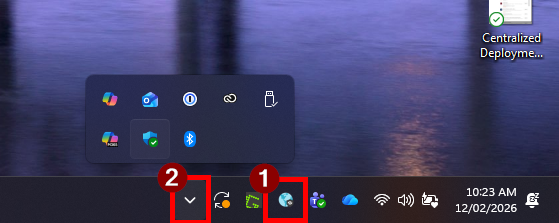
The GlobalProtect app can be found running in the system tray (1). If you cannot find the GlobalProtect icon, please check the items hidden behind the drop-down menu (2).
How to Connect
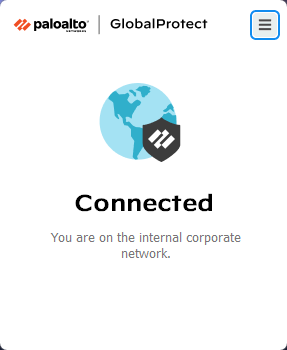
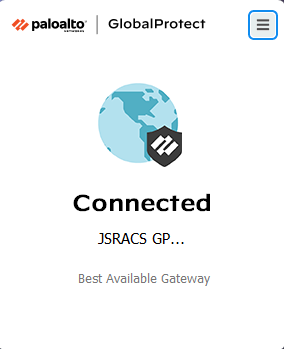
GlobalProtect automatically attempts to connect to the JSR VPN when your devices joins a new network (such as when you connect to your home Wi-Fi, or a mobile hotspot). You can check the status of GlobalProtect with a single click on the GlobalProtect icon.
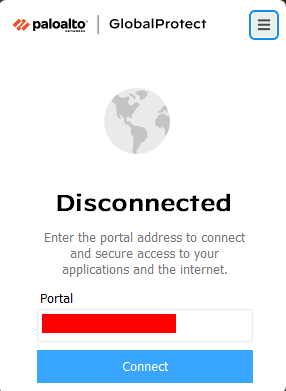
If GlobalProtect has not automatically connected, or fails to connect, you can press "Connect" to attempt a reconnect. The address to the VPN network should be pre-filled. Do not change this address.
| Connected to JSR Network (Wi-Fi or Ethernet) | Successfully Connected to JSR VPN (Remote Connection) | Disconnected from JSR Network & JSR VPN |
|---|---|---|
 |  |  |
How to Login
When connecting to GlobalProtect, you may be prompted to login via a pop-up window. This pop-up requires your Microsoft credentials (email and password).
Given this uses your Microsoft sign-in, you may be required to complete multi-factor authentication (MFA) using the Microsoft Authenticator app (or other supported methods).
Don't be alarmed if it signed you in automatically! If you recently signed in to your Microsoft account in another app you won't be required to sign in again.