
The following letters are most common.
- Letter of Commendation
- Primary Academic Performance
- Academic Progress Concern
- Primary Formal Letter of Unsatisfactory Behaviour / Formal Letter of Unsatisfactory Behaviour
1. Find the student for whom a letter should be sent. You can find students from your classes via the attendance page, or by name in the student information panel (SIP)
i) In “teaching workspace” screen – click on attendance @ icon

ii) Your class list will now appear – select the required student and their details will appear in the SIP (Student Information Panel)

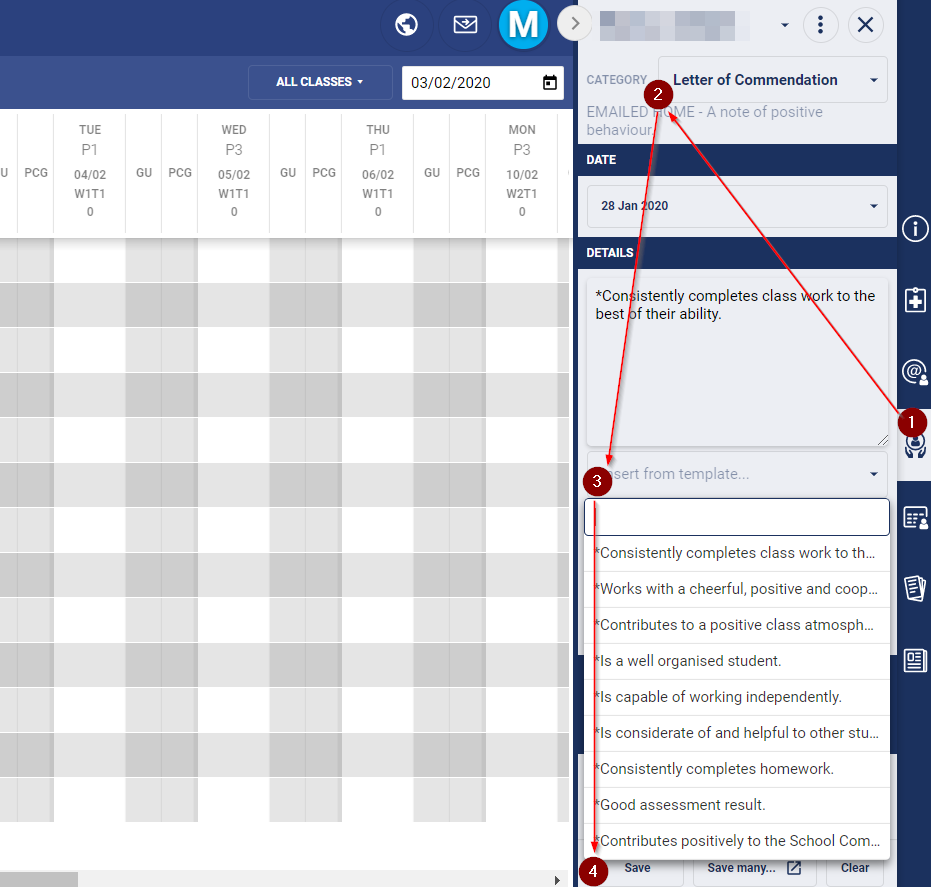
2. To create a letter click on the Pastoral Care icon.
i) Click on the Category box and select from the drop down menu.
ii) In the Template box, select statement(s) from the drop down box. Ensure you press ’enter’ after each statement to bring cursor to a new line. You can add an individual comments if you wish by typing directly under the selected statement(s).
iii) Finally, click Save.
This letter will now be created and Student Admin will print and post it! The name of the person logged in and entering this detail will appear on the letter.